
Scale Tapper2.1 - App Store
You'll be able to see results in few seconds.
Publisher Description
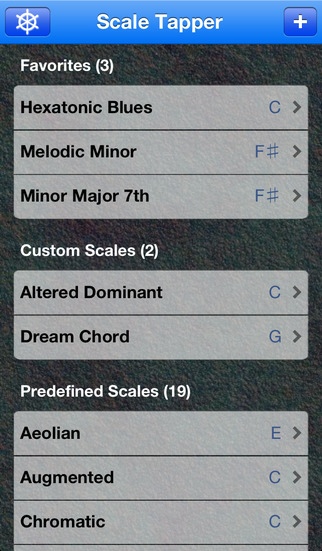
Musicians Rejoice! Scale Tapper 2.0 has arrived! What do you need in a music app? Scale Tapper has it all!
Five reasons you need to get Scale Tapper now:
Music theory, scales, chords, and now Stave Notation
New in 2.0 is the Musical staff. No matter if you are learning Bass Clef or Treble Clef, or both! With the Grand Staff layout you select the Octaves and Clefs you want to visualize. Listen to the built-in chords and scales or go all out and create your own configurations with Pitch Constellations.
Pitch Wizard - aka Pitch Constellation Search
What chord is B-D-F -A? If you had Scale Tapper just tap the Search button, and voila! That's the B Minor 7th Chord! With the Pitch Constellation search function Scale Tapper becomes a powerful tool for every true musician.
Built-in Tablatures!
Also new in 2.0. The built-in tablatures automatically adapt to your tuning and playing style. Playing a 5-string Drop-D bass? Automatically locate scales and chords on the bass tab. Ukulele tabs, guitar tabs, you name it. It's all possible with Scale Tapper no matter how many strings you play or how creative your tuning.
Become any stringed instrument you desire
Whether you play a Balalaika or a 12-string Guitar or anything in between with Scale Tapper you have the power to tune and create your very own string instrument. New in 2.0 is the option for 11-string instruments. Yes Oud and Alto Guitar players rejoice! You can now custom tune your fretboards with Scale Tapper.
Jam out on the Interactive Fretboard
You've visualized your scales and chords with the Pitch Constellations, you've listened note by note forwards and backwards on the built-in music staff, you've invented some new chord fingerings on the tablature, now Jam out on the Interactive Fretboard!
Scale Tapper is here. Revolutionize music!
Scales and chords are the basis of all songs known to man. Become a 3-string balalaika hero, build a 12-string bass guitar, amaze us all with revolutionary new chord progressions.
Scale Tapper 2.0 has many other features:
String Support - On the iPhone/iPod Touch instrument mode supports 3,4,5 or 6 strings. The iPad supports these in addition to 7,8,9,10,11, or 12 strings.
Double-Tap to Transpose - Transpose any scale or chord by double-tapping the tonic note on the Pitch Constellation.
Themes - Trick out your Scale Tapper with the new Darkness Theme now available in addition to the Blue, Pink, Bamboo, and Classic Themes.
Landscape/Portrait Mode - The iPhone, iPod Touch, and iPad all support both Landscape and Portrait modes.
Built-in Scales. Looking for a mystic sound? Try a Phrygian church mode. Or jam out with a Hexatonic Blues scale. With Pitch Constellations you can learn and discover new interactions between the scales themselves.
Predefined Chords. Major and Minor Triads, Diminished and Augmented 7th chords, they're all here. Visualize and listen to the Chords in Stave Notation or play along on the interactive fretboard. Change the root on the fly and try playing it back in different octaves.
Full flat and sharp support. Instantly convert between sharp notes ( ) and flat notes ( ). Whether working with a Major or Minor scale or a diatonic chord you'll never again forget the ordering of flats and sharps.
Tips
The predefined scales and chords can only be transposed and key changed. Refresh the scale and it will return to the default key of C.
Create your own scales by tapping the "+" button. Add scales and chords to your favorites by tapping the " " button.
Follow @ScaleTapper on Twitter and stay up to date on http://dfnt.tv/ScaleTapper with the latest news and videos. Don't forget to check out Scale Tapper: Online at http://scaletap.com.
Whether you are learning music theory or are an experienced professional, you can get your groove on much faster with the new Scale Tapper.
Requires iOS 5.0 or later. Compatible with iPhone, iPad, and iPod touch.
About Scale Tapper
The company that develops Scale Tapper is Difint, LLC. The latest version released by its developer is 2.1.
To install Scale Tapper on your iOS device, just click the green Continue To App button above to start the installation process. The app is listed on our website since 2011-07-13 and was downloaded 0 times. We have already checked if the download link is safe, however for your own protection we recommend that you scan the downloaded app with your antivirus. Your antivirus may detect the Scale Tapper as malware if the download link is broken.
How to install Scale Tapper on your iOS device:
- Click on the Continue To App button on our website. This will redirect you to the App Store.
- Once the Scale Tapper is shown in the iTunes listing of your iOS device, you can start its download and installation. Tap on the GET button to the right of the app to start downloading it.
- If you are not logged-in the iOS appstore app, you'll be prompted for your your Apple ID and/or password.
- After Scale Tapper is downloaded, you'll see an INSTALL button to the right. Tap on it to start the actual installation of the iOS app.
- Once installation is finished you can tap on the OPEN button to start it. Its icon will also be added to your device home screen.
Program Details
System requirements
Download information
Pricing
Version History
version 2.1
posted on 2011-07-13
Disclaimer
Official App Store Link
We do not host Scale Tapper on our servers. We did not scan it for viruses, adware, spyware or other type of malware. This app is hosted by Apple and passed their terms and conditions to be listed there. We recommend caution when installing it.
The App Store link for Scale Tapper is provided to you by apps112.com without any warranties, representations or guarantees of any kind, so access it at your own risk.
If you have questions regarding this particular app contact the publisher directly. For questions about the functionalities of apps112.com contact us.
